General articles on technical subjects.

MediaTek’s partners deliver OpenCL on their phones

MediatekSeveral Chinese phones bring OpenCL to millions of users, as MediaTek offers their drivers to all phone vendors who use their (recent) chipsets.

Mediatek said that you just need a phone with one of the below chipsets and you can run your OpenCL-app, as they provide the driver-stack with the hardware to their customers. I’ve added a few phone names, but there is no guarantee OpenCL drivers are actually there. So be on the safe side and don’t buy the cheapest phone, but a more respected China-brand. Contact us if  you got a phone with the chipset that doesn’t work – then I’ll contact Mediatek. Share you experience with the chipset in the comments.

In case you want to use the phone for actual use, be sure it supports your 4G frequencies. Also check this Gizchina article on the below chipsets. There are more MediaTek-chipsets that support OpenCL, but not openly – they prefer to focus on their latest 64-bit series.

Important note on conformance: Mediatek is an adopter and does conform for a few processors. Of the ones listed below, only MT6795 is certain to have official support. Continue reading “MediaTek’s partners deliver OpenCL on their phones” →
The knowns and unknowns of the PEZY-SC accelerator at RIKEN

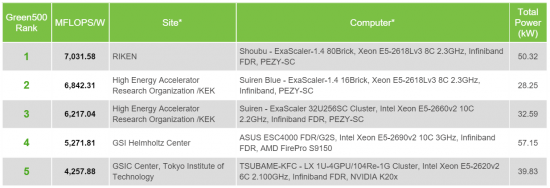
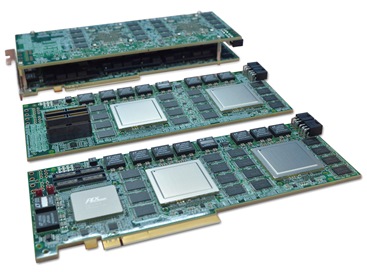
PEZY-SC_QuadPCB-1_smallThe green500 is out and one unknown processor takes the number one position with a huge improvement over last year. It is a new super-computer installed at RIKEN with an incredible 7 GFLOPS/Watt. It is powered by the processor-boards at the right: two Xeons, 4 PEZY-SC 1.4 accelerators and 128GB DRAM, which have a combined performance of about 6.2 TFLOPS. It has been designed for immersive cooling.

The second and third positions are also powered by the PEZY-SC, before we find the winner of last year: the AMD FirePro S9150 and a bit after that the rest (mostly NVidia Tesla). One constant is the CPUs used: Intel XEON is taking most. To my big surprise no ARM64.

green500_2015june_top5

From the third to the first PEZY-SC installation there is an improvement of 13%. It seems the first two are the new type, called “bricks”, while the third is the same as last year. Comparing with that super from last year (4.4945 GFLOPS/W) there is an improvement of 42% and 25%. The 13% improvement from the previous version is interesting enough, but the 25% improvement on exactly the same system raised questions. Probably it is due to compiler-optimisations. As the November-version of the Green500 is much more strict, it will be clear if the rules were bent – let’s hope it’s for real!

It supports OpenCL!

When new accelerators support OpenCL, it gets accepted more easily. So it is very interesting the PEZY-SC runs on OpenCL. I asked at ISC and got explained it was a subset of OpenCL, but could not get the finger on which subset, nor could I get access to test it. It does mean that code that would run well on this machine is easy to port. And then I mean the same “easy” Intel uses for explaining the easyness of porting OpenMP software to XeonPhi: PEZI-specific optimisations and writing around the missing functionality would still take effort – the typical stuff we do at StreamHPC.

RIKEN Shoubu

Some information on “Shoubu” (“Iris” in Japanese), the top 1 on the Green 500. According to the Green500 it is 353.8 TFLOPS (based on 50kW, using an actual benchmark). On 25 June RIKEN announced the Shoubu is 2 PFLOPS (theoretical). If the full machine is used for the Green500, then the efficiency was only 18%!

Below are some images of the installation.

shoubu2  shoubu3  shoubu1

Source: http://www.exascaler.co.jp/wp-content/uploads/2015/06/20150625.pdf

An important part is Exascaler’s immersion technology, what I understood is a spin-off of PEZY. I’m very curious what the AMD FirePro S9150 does when it uses immersion-cooling – I think we have to do some frying at the office to find out.

PEZY-SC1.4 and PEZY-SC2

PEZY started with a multi-core processor of 512 cores, the PEZY-1. The PEZY-SC has 1024 cores and has had a few gradual upgrades – currently PEZY-SC 1.4 (“the brick”) is installed.

PEZY-SC Specification:

Logic Cores(PE) 1,024
Core Frequency 733MHz
Peak Performance Floating Point. Single 3.0TFlops / Double 1.5TFlops
Host Interface PCI Express GEN3.0 x8Lane x 4Port (x16 bifurcation available)
JESD204B Protocol support
DRAM Interface DDR4, DDR3 combo 64bit x 8Port Max B/W 1533.6GB/s
+Ultra WIDE IO SDRAM (2,048bit) x 2Port Max B/W 102.4GB/s
Control CPU ARM926 dual core
Process Node 28nm
Package FCBGA 47.5mm x 47.5mm, Ball Pitch 1mm, 2,112pin

Source: http://pezy.co.jp/en/products/pezy-sc.html

Development on PEZY-SC2 is ongoing, which will have a staggering 4096 cores. Ofcourse efficiency has to go up (if the 18% is correct), to make this a good upgrade.

There is no promise on when the PEZY-SC2 will be announced, but it will certainly surprise us again hen it arrives.

Xeon Phi Knights Corner compatible workstation motherboards

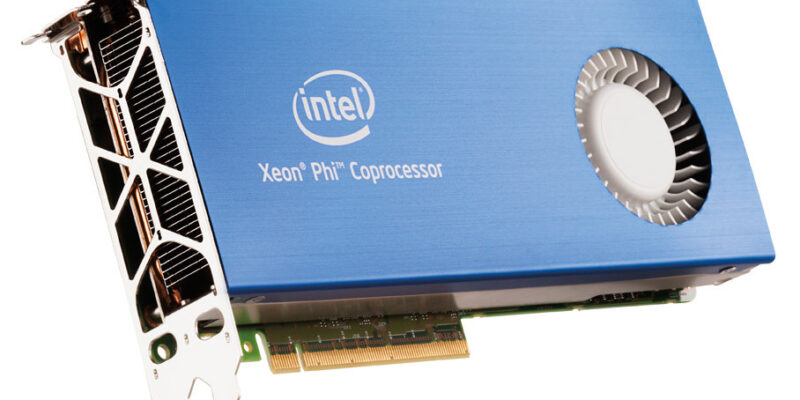
xeonphiIntel has assumed a lot if it comes to XeonPhi’s. One was that you will use it on dual-Xeon servers or workstations and that you already have a professional supplier of motherboards and other computer-parts. We can only guess why they’re not supporting non-professional enthusiasts who got the cheap XeonPhi.

After browsing half the internet to find an overview of motherboards, I eventually emailed Gigabyte, Asus and ASrock for more information for a desktop-motherboard that supports the blue thing. With the information I got, I could populate the below list. Like usual we share our findings with you.

Quote that applies here: “The main reason business grade computer supplies can be sold at a higher price is that the customers don’t know what they’re buying“. When I heard, I did not know why the customer is not well-informed – now I do. Continue reading “Xeon Phi Knights Corner compatible workstation motherboards” →

Event: Embedded boards comparison

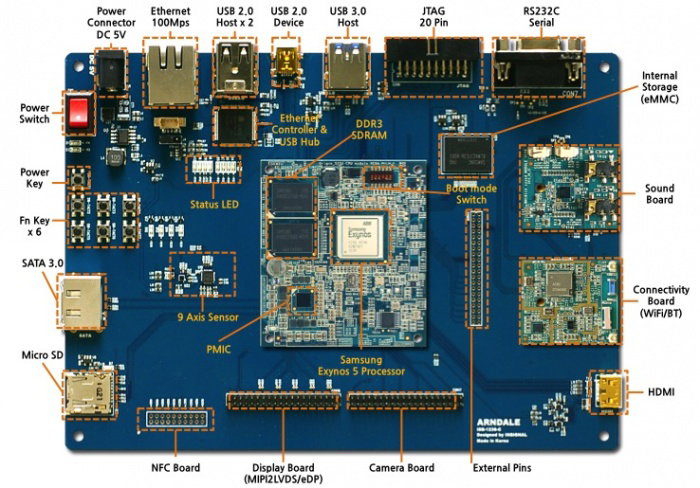
A 2012 board
One of the first OpenCL enabled boards from 2012.

Date: 17 September 2015, 17:00
Location: Naritaweg 12B, Amsterdam
Costs: free

Selecting the right hardware for your OpenCL-powerd product is very important. We therefore organise a three hour open house where we you can test, benchmark and discuss many available chipsets that support OpenCL. For each showcased board you can read and hear about the advantages, disadvantages and preferred types of algorithms.

Board with the following chipsets will be showcased:

  • ARM Mali
  • Imagination PowerVR
  • Qualcomm Snapdragon
  • NVidia Tegra
  • Freescale i.MX6 / Vivante
  • Adapteva

Several demo’s and benchmarks are prepared that will continuously run on each board. We will walk around to answer your questions.

During the evening drinks and snacks are available.

Test your own code

There is time to test OpenCL code for free in our labs. Please get in contact, as time that evening is limited.

Registration

Register by filling in the below form. Mention with how many people you will come, if you come by car and if you want to run your own code.

[contact_form]

Nordic/Scandinavian GPGPU-day on 29 September 2015

Scandinavian-GPGPUday-logoAfter two events in the Netherlands, the third GPGPU-day will be held in Copenhagen!

Speakers are researchers and companies from the Nordic and Scandinavian countries. If you’re interested in speaking at the conference, get in touch.

Date: 29 September 2015
Location: Copenhagen, DK
Venue: Danish Architecture Centre (route)
Price, early bird: €225
Price, student: €100
Price, normal: €275

The main goal is to connect GPGPU specialist and researchers from the Nordic countries. In the Netherlands, a small country of 17 million, this has helped a lot to interlink 13 research groups. The Scandinavian/Nordic countries have a combined population of 26 million, potentially having around 20 GPU-related research groups. We hope this event will help in starting several collaborations and with that more activity around GPGPU in the north of Europe.

Sponsor packages start at €500 including one ticket.

For an impression, see the below video.

Call for speakers

Are you are doing research using OpenCL or CUDA, and are situated in Denmark, Iceland, Norway, Sweden or Finland, you are invited to speak about your work in front of 60 to 70 people. We expect visitors from Germany and several other European countries too.

Time-slots are 25 minutes, with a maximum of 8 slots available.

Why should you attend?

  • Meet others in the parallel programming industry and research.
  • Learn about research that is done with GPUs today.
  • Find out if you can use GPUs for your own challenges.

See you in Copenhagen!

For more information, see the official page. For tickets, see below.

Apple Metal versus Vulkan + OpenCL 2.2

Metal
Metal – Apple’s me-too™ language

Update: C++ has been moved from OpenCL 2.1 to 2.2, being released in 2017. Title and text have been updated to reflect this. A reason why Apple released Metal might be the reason that Khronos was too slow in releasing C++ kernels into OpenCL, given the delays.

Apple Metal in one sentence: one queue for both OpenCL and OpenGL, using C++11. They now brought it to OSX. The detail they don’t tell: that’s exactly what the combination of Vulkan + OpenCL 2.1 2.2 does. Instead it is compared with OpenCL 1.x + OpenGL 4.x, which it certainly can compete with, as that combination doesn’t have C++11 kernels nor a single queue.

Apple Metal on OSX – a little too late, bringing nothing new to the stage, compared to SPIR and OpenCL 2.1 2.2.

The main reason why they can’t compete with the standards, is that there is an urge to create high-level languages and DSLs on top of lower-level languages. What Apple did, was to create just one and leaving out the rest. This means that languages like SYCL and C++AMP (implemented on top of SPIR-V) can’t simply run on OSX, and thus blocking new innovations. To understand why SPIR-V is so important and Apple should adopt for that road, read this article on SPIR-V.

khronos-SPIR-V-flowchart
Metal could compile to SPIR-V, just like OpenCL-C++ does. The rest of the Metal API is just like Vulkan.

Yet another vendor lock-in?

Now Khronos is switching its two most important APIs to the next level, there is a short-term void. This is clearly the right moment for Apple to take the risk and trying to get developers interested in their new language. If they succeed, then we get the well-known “pffff, I have no time to port it to other platforms” and there is a win for Apple’s platforms (they hope).

Apple has always wanted to have a different way of interacting with OpenCL-kernels using Grand Central Dispatch. Porting OpenCL between Linux and Windows is a breeze, but from and to OSX is not. Discussions over the past years with many people from the industry thought me one thing: Apple is like Google, Microsoft and NVidia – they don’t really want standards, but want 100% dedicated developers for their languages.

Yes, now also Apple is on the list of Me-too™ languages for OpenCL. We at StreamHPC can easily translate your code from and too Metal, but we would like it that you can put your investments in more important matters like improving the algorithms and performance.

Still OpenCL support on OSX?

Yes, but only OpenCL 1.2. A way to work around is to use SPIR-to-Metal translators and a wrapper from Vulkan to Metal – this will not make it very convenient though. The way to go, is that everybody starts asking for OpenCL 2.0 support on OSX forums. Metal is a great API, but that doesn’t change the fact it’s obstructing standardisation of likewise great, open standards. If they provide both Metal and Vulkan+OpenCL 2.1 2.2 then I am happy – then the developers have the choice.

Metal debuts in “OSX El Capitan”, which is available per today to developers, and this fall to the general public.

StreamComputing exists 5 years!

5yearsSCIn January 2010 I created the first steps of StreamComputing (redacted: rebranded to StreamHPC in 2017), by registering the website and writing a hello-world article. About 4 months of preparations and paperwork later the freelance-company was registered. Then 5 years later it got turned into a small company with still the strong focus on OpenCL, but with more employees and more customers.

I would like to thank the following people:

  • My parents and grand-mother for (financially) supporting me, even though they did not always understand why I was taking all those risks.
  • My friends, for understanding I needed to work in the weekends and evenings.
  • My good friend Laura for supporting me during the hard times of 2011 and 2012.
  • My girlfriend Elena for always being there for me.
  • My colleagues and OpenCL-experts Anca, Teemu and Oscar, who have done the real work the past year.
  • My customers for believing in OpenCL and trusting StreamComputing.

Without them, the company would never even existed. Thank you! Continue reading “StreamComputing exists 5 years!” →

8 reasons why SPIR-V makes a big difference

From all the news that came out of GDC, I’m most eager to talk about SPIR-V. This intermediate language spir-vwill make a big difference for the compute-industry. In this article I’d like to explain why. If you need a technical explanation of what SPIR-V is, I suggest you first read gtruc’s article on SPIR-V and then return here to get an overview of the advantages.

Currently there are several shader and c ompute languages, which SPIR-V tries to replace/support. We have GLSL, HLSL for graphics shaders, SPIR (without the V), OpenCL, CUDA and many others for compute shaders.

If you have questions after reading this article, feel free to ask them in a comment or to us directly. Continue reading “8 reasons why SPIR-V makes a big difference” →

Apple’s dragging OpenCL compiler problem

OSX-brokenRemember the times that the OpenCL compilers where not that good as they’re now? Correct source-code being rejected, typos being accepted, long compile times, crashes during compiling and other irritating bugs. These made the work of an OpenCL developer in “the old days” quite tiresome – you needed a lot of persistence and report bugs. Lucky on desktops the drivers have improved a lot.
Apple’s buggy OpenCL compiler

Now to Apple. There have always been complaints about the irritating bugs that were in Apple’s compiler. Recently the Luxrender community started to make more complaints, as the guy responsible for the OSX port decided to quit. This was due to utter frustration: code that worked on every other OS, simply did not work on OSX. Luxrender’s Paolo Ciccone stood up and made this extremely public, by writing an open letter to Apple’s CEO Tim Cook (posted below).

The letter is not specific about the kind of bugs and and therefore asked him via Twitter which were the bugs he was talking about. He explained me that it’s very simple:

Here at StreamHPC we could write around those bugs in most cases, but Luxrender has bigger and more complex kernels than we used in our projects – then it’s simply impossible to write around, as the compiler simply crashes. It seems that OSX still has those old compilers, Linux and Windows used to have years ago.

Metal

Metal is the OpenCL-alternative on iOS 8 and up.

If you’re thinking that Metal could be a reason – that language looks very much like OpenCL, as it’s simply OpenCL as Apple would like it to be. Porting between the two languages is therefore quite simple. This also means that with some small fixes a Metel-kernel could be compiled by existing OpenCL-compiler. Ok, there is much more than the compute part, but the message is that more complex Metal wouldn’t be possible using this driver-stack.

If we end up in a situation that Metal comes to OSX and is more stable than OpenCL, only then we can say that Apple tries to block OpenCL in favour of their own APIs.

The letter

I’m really happy that Paolo Ciccone had the guts to publicly complain. This is the letter he wrote:

Dear Mr. Cook.

I’m sorry to bother you but we have tried all other channels and nothing worked.

I’m part of a group of developers of a physically-based renderer called LuxRender. LuxRender has been written to use OpenCL to accelerate its enormous amount of computation necessary to generate photo-realistic scenes. You can see some of the images generated by Lux at http://luxrender.net. Lux is an Open Source program.

Apple has defined OpenCL and we have adopted this API instead of the proprietary CUDA in order to be able to work with all kind of hardware on all major platforms. It made sense for an OSS to use an open standard.

The reason why I’m writing to you is that, after waiting for years, we still have broken GPU drivers on OS X. Scenes that render perfectly well on Windows and even on Linux simply abort on OS X. This is happening with both AMD and nVidia GPUs.

The problem is unsolvable from our side. We need updated, fixed drivers for OS X. The problem is so bad hat our main OS X developer has announced, today, that he is giving up OS X. He simply can’t do his job.

I kindly request that you look into this and give us working AMD and nVidia drivers in an upcoming, possibly soon, update of OS X. We are more than willing to work with your engineers, if you need any kind of specific help in identifying the problem.

Thank you for your attention.

Paolo Ciccone

If you want to help, also post this letter on your blog or in a forum. The more this is shared, the better. Especially Apple’s forum, asking for the official statement.

OpenCL in simple words

opencl-logoOur business is largely around making software faster. For that we use OpenCL, but do you know what this programming language is? Why can’t this speeding-up be done using other languages like Java, C#, C++ or Python?

OpenCL the answer to high-level languages, where we were promised superfast software that was very quick to write. After 20 years this was still a promise, as compilers had to guess too much what was intended. OpenCL gives the programmer more control in the places where more control is needed to get high-performing code and leave less guesses for the compiler.

It’s C with some extra power

It’s like normal C with three extra concepts, all with the aim to make the software run faster.

Explicit Data Transfer

In other introductions to OpenCL the data-transfers are mentioned as one of the last parts, but I find this the most important one. Reason: in most cases this is the main bottleneck in performance-targeted code.

When moving your stuff to another house, you pack all in boxes first before loading the truck. Or would you load each item into the truck one-by-one? Transport-costs would be much higher that way.

While it would be great that the fastest data-transfers should be done automatically, it simply doesn’t work like that. This means that designing the data-transfers is an important task when making fast software. OpenCL lets you do this.

Multiple cores

Most people have heard of “cores”, as made famous by Intel. Each core can do a part of a computation and effectively reduce runtime. OpenCL implements this by isolating the code that runs on each core – what goes in and out the protected code is done explicitly. This way the code is really easy to scale up to thousands of cores.

Would you choose the best-in-class to write the multiplication tables from 1 to 20, or have each student write one of them? Even though the slowest student will limit the rest, the total time is still lower.

Where a normal processor has 1, 2, 4 or 8 cores, a graphics processor has hundreds or even thousands of cores. OpenCL-software works on both.

Vectors

Modern processors can do computations on more than one data-item at the same time. They can be described as sub-cores. This means that each core has parallelism on its own.

When reading, do you read one word at once or character by character? Your brains can parse multiple characters at the same time.

OpenCL has support for “vectors” ( bundles of alike data) to be able to program these sub-cores.

It runs on many types of devices

OpenCL is famous for being the standard programming model for a lot of modern processors. There is no other programming language that can do the same. Support is available on:

  • CPUs; standard processors by Intel, AMD and ARM
  • GPUs; graphics cards by Intel, AMD and NVIDIA
  • FPGAs; processors that are programmed on the hardware-level, by Altera and Xilinx.
  • DSPs; digital signal processors by TI
  • Mobile graphics processors by ARM, Imagination, Qualcomm, etc.
  • See the rest of the list here.

This means that code can be ported to new devices in days or weeks instead of having to rewrite everything from scratch.

How does translating to OpenCL work?

When software needs to be faster, the first step is to find out its bottlenecks – these “hot spots” will be ported to OpenCL, while the rest remains the same. Then comes the hardest part: changing the algorithms such that data-transfers are more efficient and all cores are used. The last step is to look into low-level optimisations like the vectors.

Above is a very simplified representation of OpenCL. Still you’ve seen that the language is very unique and powerful. That will change, as its concepts are slowly getting embedded into existing languages – till then OpenCL is the only standard which fully enables all hardware features.

GPUDirect and DirectGMA – direct GPU-GPU communication via RDMA

Wrong!
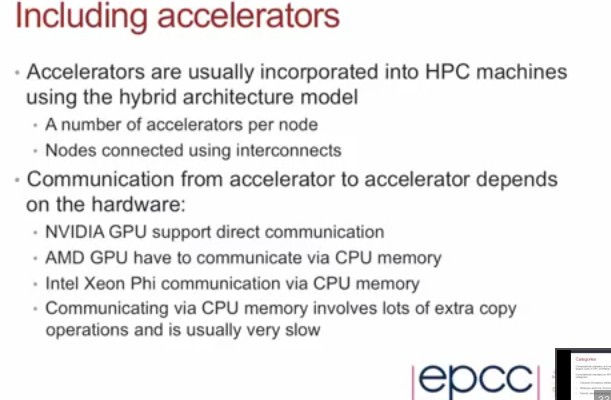
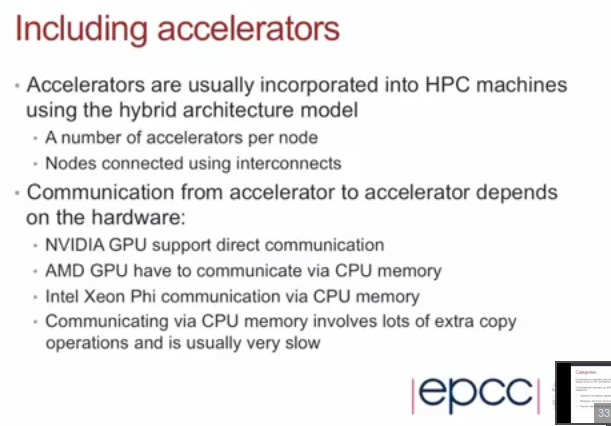
In contrary to what you see around (on slides like these), AMD and Intel also have support for RDMA.

A while ago I found the slide at the right, claiming that AMD did not have any direct GPU-GPU communication. I found at several sources there was, but it seems not to be a well-known feature. The feature is known as SDI (mostly on network-cards, SSDs and FPGAs), but not much information is found on PCI+SDI. More often RDMA is used: Remote Direct Memory Access (wikipedia).

Questions I try to answer:

  • Which server-grade GPUs support direct GPU-GPU communication when using OpenCL?
  • What are other characteristics interesting for OpenCL-devs besides direct communication GPU-GPU, GPU-FPGA, GPU-NIC?
  • How do you code such fast communication?

Enjoy reading! Continue reading “GPUDirect and DirectGMA – direct GPU-GPU communication via RDMA” →

Building the HPC ecosphere in Amsterdam

HPHere in Amsterdam a lot is going on around HPC. Including StreamHPC, we have companies like Vancis, Netherlands eScience Centre,  and ClusterVision, the research institute for Dutch HPC, Surf SARA, (hosting the Dutch supercomputer) and the very busy Amsterdam IX.

Here in Amsterdam we’re focused on building up more local companies around big compute and big data. I’d like to give two examples. One is Scyfer, an academic startup specialised in deep learning. They’ve developed algorithms to more efficiently train neural networks and help their customers find answers quicker. The second is Euvision Technologies, who developed unique computer vision solutions. Last year it has been sold to Qualcomm, for tens of millions.

We welcome new companies to Amsterdam, to further build up the HPC-ecosphere. If you have a company and are seeking a good location, contact us to talk about HPC in Amsterdam.There are many opportunities to develop in Europe, and we’re open for partnerships in new markets.

If you want to start your own HPC-related startup, Amsterdam thinks of you! There are three steps to do:

  1. Go to the Venture café on 30 April
  2. Apply for the bootcamp
  3. Become our neighbours
  4. Build your own HPC startup

Ping me, if you want advice on which preparations you need to make, before you can make such big decision. I like to have an open discussion, so please use the comment-area below for what you think of HPC in Amsterdam and building companies.

Four conferences that will interest you

OpenCL Events
OpenCL Events

(if you get to Palo Alto, Manchester, Karlsruhe and Copenhagen)

We’re supporters of open standards and open discussions. When those thow come together, we melt. Therefore I’d like to share four hot conferences with you: IWOCL (Palo Alto, SF, USA), EMiT (Manchester, UK), ParallelCon (Karlsruhe, Germany), GPGPU-day 2015 (Copenhagen, Denmark).

On all these conferences I’ll be there too and are happy to meet you.

This post was shared first via the newsletter. Subscribe here.

Continue reading “Four conferences that will interest you” →

How to install OpenCL on Windows

windows-start-openclGetting your Windows machine ready for OpenCL is rather straightforward. In short, you only need the latest drivers for your OpenCL device(s) and you’re ready to go. Of course, you will need to add an OpenCL SDK in case you want to develop OpenCL applications but that’s equally easy.

Before we start, a few notes:

  • The steps described herein have been tested on Windows 8.1 only, but should also apply for Windows 7 and Windows 8.
  • We will not discuss how to write an actual OpenCL program or kernel, but focus on how to get everything installed and ready for OpenCL on a Windows machine. This is because writing efficient OpenCL kernels is almost entirely OS independent.

If you want to know more about OpenCL and you are looking for simple examples to get started, check the Tutorials section on this webpage.

Running an OpenCL application

If you only need to run an OpenCL application without getting into development stuff then most probably everything already works.

If OpenCL applications fail to launch, then you need to have a closer look to the drivers and hardware installed on your machine:

GPU Caps Viewer
GPU Caps Viewer
  • Check that you have a device that supports OpenCL. All graphics cards and CPUs from 2011 and later support OpenCL. If your computer is from 2010 or before, check this page. You can also find a list with OpenCL conformant products on Khronos webpage.
  • Make sure your OpenCL device driver is up to date, especially if you’re not using the latest and greatest hardware. With certain older devices OpenCL support wasn’t initially included in the drivers.

Here is where you can download drivers manually:

  • Intel has hidden them a bit, but you can find them here with support for OpenCL 2.0.
  • AMD’s GPU-drivers include the OpenCL-drivers for CPUs, APUs and GPUs, version 2.0.
  • NVIDIA’s GPU-drivers mention mostly CUDA, but the drivers for OpenCL 1.1 1.2 are there too.

In addition, it is always a good idea to check for any other special requirements that the OpenCL application may have. Look for device type and OpenCL version in particular. For example, the application may run only on OpenCL CPUs, or conversely, on OpenCL GPUs. Or it may require a certain OpenCL version that your device does not support.

A great tool that will allow you to retrieve the details for the OpenCL devices in your system is Caps Viewer.

Developing OpenCL applications

Now it’s time to put the pedal to the metal and start developing some proper OpenCL applications.

The basic steps would be the following:

  • Make sure you have a machine which supports OpenCL, as described above.
  • Get the OpenCL headers and libraries included in the OpenCL SDK from your favourite vendor.
  • Start writing OpenCL code. That’s the difficult part.
  • Tell the compiler where the OpenCL headers are located.
  • Tell the linker where to find the OpenCL .lib files.
  • Build the fabulous application.
  • Run and prepare to be awed in amazement.

Ok, so let’s have a look into each of these.

OpenCL SDKs

For OpenCL headers and libraries the main options you can choose from are:

As long as you pay attention to the OpenCL version and the OpenCL features supported by your device, you can use the OpenCL headers and libraries from any of these three vendors.

OpenCL headers

Let’s assume that we are developing a 64bit C/C++ application using Visual Studio 2013. To begin with, we need to check how many OpenCL platforms are available in the system:

[raw]

#include<stdio.h>
#include<CL/cl.h>

int main(void)
{
    cl_int err;
    cl_uint numPlatforms;

    err = clGetPlatformIDs(0, NULL, &numPlatforms);
    if (CL_SUCCESS == err)
         printf("\nDetected OpenCL platforms: %d", numPlatforms);
    else
         printf("\nError calling clGetPlatformIDs. Error code: %d", err);

    return 0;
}

[/raw]

We need to specify where the OpenCL headers are located by adding the path to the OpenCL “CL” is in the same location as the other CUDA include files, that is, CUDA_INC_PATH. On a x64 Windows 8.1 machine with CUDA 6.5 the environment variable CUDA_INC_PATH is defined as “C:\Program Files\NVIDIA GPU Computing Toolkit\CUDA\v6.5\include”

If you’re using the AMD SDK, you need to replace “$(CUDA_INC_PATH)” with “$(AMDAPPSDKROOT)/include” or, for Intel SDK, with “$(INTELOCLSDKROOT)/include“.

OpenCLNVIDIA_AdditionalInclude

OpenCL libraries

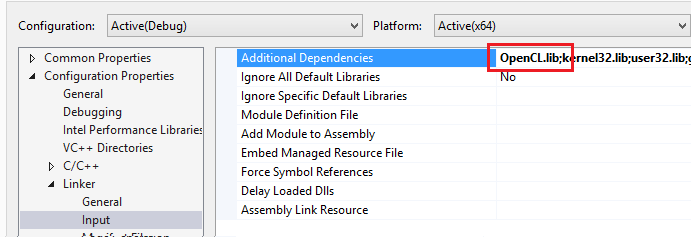
Similarly, we need to let the linker know about the OpenCL libraries. Firstly, add OpenCL.lib to the list of Additional Dependencies:

OpenCLNVIDIA_AdditionalDependencies

Secondly, specify the OpenCL.lib location in Additional Library Directories:

OpenCLNVIDIA_AdditionalLibrary

As in the case of the includes, If you’re using the AMD SDK, replace “$(CUDA_LIB_PATH)” with “$(AMDAPPSDKROOT)/lib/x86_64” , or in the case of Intel with “$(INTELOCLSDKROOT)/lib/x64“.

And you’re good to go! The application should now build and run. Now, just how difficult was it? Happy OpenCL-coding on Windows!

If you have any question or suggestion, just leave a comment.

Internships: the self-driving vehicle – updated

UPDATE: We now only offer thesis support (“externs”), for students who want to use OpenCL in their research, but don’t have such support at their university. for the rest the below applies.

From July there are several internships available here at StreamHPC, all around self-driving vehicles (or even self-flying drones). 800px-Toy_car_1This means that with an interest in AI, embedded programming and sensors, you’re all set.
You can work as an intern for a period from 1 to 6 months, and combine it with your thesis. We will assist you with planning, thesis correction and technical support (especially OpenCL). There are also a few other startups in the building, who you’d like to talk with.

Your time will exist of literature studies, programming, testing, OpenCL-optimisations and playing. We’ll work with bikes and toy-cars, so no big cars that are expensive to crash. Study fields are road-location, obstacles, driving-style detection, etc.

If you want to do an internship purely to gain experience, we can offer you a combination of research and working for real customers.

Some targets:

  • Create a small test-car full with sensors:
    • radar for distance
    • multi cameras
    • laser
    • other sensors, like touch
  • Programming an embedded board with OpenCL-capability.
  • Programming pointcloud algorithms in OpenCL.
  • Defining the location on the road, also in OpenCL. (taken)
  • Detecting pedestrians, signs.
  • Have fun creating this.

Please contact us and tell your ideas and plan.

Overview of OpenCL 2.0 hardware support, samples, blogs and drivers

opencl20We were too busy lately to tell you about it: OpenCL 2.0 is getting ready for prime time! As it makes use of the more recent hardware features, it’s therefore more powerful than OpenCL 1.x could ever be.

To get you up to speed, see this list of new OpenCL 2.0 features:

  • Shared Virtual Memory: host and device kernels can directly share complex, pointer-containing data structures such as trees and linked lists, providing significant programming flexibility and eliminating costly data transfers between host and devices.
  • Dynamic Parallelism: device kernels can enqueue kernels to the same device with no host interaction, enabling flexible work scheduling paradigms and avoiding the need to transfer execution control and data between the device and host, often significantly offloading host processor bottlenecks.
  • Generic Address Space: functions can be written without specifying a named address space for arguments, especially useful for those arguments that are declared to be a pointer to a type, eliminating the need for multiple functions to be written for each named address space used in an application.
  • Improved image support:  including sRGB images and 3D image writes, the ability for kernels to read from and write to the same image, and the creation of OpenCL images from a mip-mapped or a multi-sampled OpenGL texture for improved OpenGL interop.
  • C11 Atomics: a subset of C11 atomics and synchronization operations to enable assignments in one work-item to be visible to other work-items in a work-group, across work-groups executing on a device or for sharing data between the OpenCL device and host.
  • Pipes: memory objects that store data organized as a FIFO and OpenCL 2.0 provides built-in functions for kernels to read from or write to a pipe, providing straightforward programming of pipe data structures that can be highly optimized by OpenCL implementers.
  • Android Installable Client Driver Extension: Enables OpenCL implementations to be discovered and loaded as a shared object on Android systems.

I could write many articles about the above subjects, but leave that for later. This article won’t get into these technical details, but more into what’s available from the vendors. So let’s see what toys we were given!

A note: don’t start with OpenCL 2.0 directly, if you don’t know the basic concepts of OpenCL. Continue reading “Overview of OpenCL 2.0 hardware support, samples, blogs and drivers” →

Is the CPU slowly turning into a GPU?

It's all in the plan
It’s all in the plan?

Years ago I was surprised by the fact that CPUs were also programmable with OpenCL – I solely chose that language for the cool of being able to program GPUs. It was weird at start, but cannot think of a world without OpenCL working on a CPU.

But why is it important? Who cares about the 4 cores of a modern CPU? Let me first go into why CPUs have had mostly 2 cores for so long, about 15 years ago. Simply put, it was very hard to program multi-threaded software that made use of all cores. Software like games did, as they needed all the available resources, but even the computations in MS Excel are mostly single-threaded as of now. Multi-threading was maybe used most for having a non-blocking user-interface. Even though OpenMP was standardised 15 years ago, it took many years before the multi-threaded paradigm was used for performance. If you want to read more on this, search the web for “the CPU frequency wall”.

More interesting is what is happening now with CPUs. Both Intel and AMD are releasing CPUs with lost of cores. Intel has recently a 18-core processor (Xeon E5 2699-v3) and AMD was offering 16-core CPUs for a longer time (Opteron 6300 series). Both have SSE and AVX, which means extra parallelism. If you don’t know what this is precisely about, read my 2011-article on how OpenCL uses SSE and AVX on the CPU.

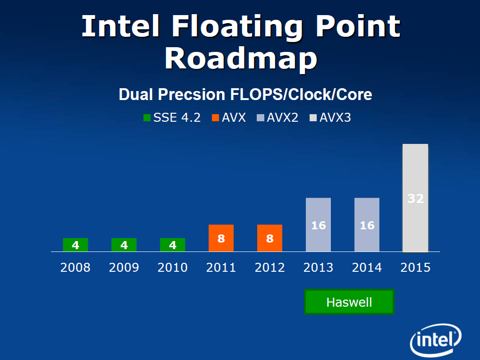
AVX3.2

Intel now steps forward with AVX3.2 on their Skylake CPUs. AVX 3.1 is in XeonPhi “Knight’s Landing” – see this rumoured roadmap. 

It is 512-bits wide, which means that 8 times as much vector-data can be computed! With 16 cores, this would mean 128 float operations per clock-tick. Like a GPU.

The disadvantage is alike the VLIW we had in the pre-GCN generation of AMD GPUs: one needs to fill the vector-instructions to get the speed-up. Also the relatively slow DDR3 memory is an issue, but lots of progress is being made there with DDR4 and stacked memory.

B6r22cCIQAAEPmP

So is the CPU turning into a GPU?

I’d say yes.

With AVX3.2 the CPU gets all the characteristics of a GPU, except the graphics pipeline. That means that the CPU-part of the CPU-GPU is acting more like a GPU. The funny part is that with the GPU’s scalar-architecture and more complex schedulers, the GPU is slowly turning into a CPU.

In this 2012-article I discussed the marriage between the CPU and GPU. This merger will continue in many ways – a frontier where the HSA-foundation is doing great work now.  So from that perspective, the CPU is transforming into a CPU-GPU; and we’ll keep calling it a CPU.

This all strengthens my believe in the future of OpenCL, as that language is prepared for both task-parallel and data-parallel programs – for both CPUs and GPUs, to say it in current terminology.

Using OpenCL 1.2 with 1.1 devices

1.1.1.2
1.1 and 1.2 nice together

Recent code uses OpenCL 1.2 more and more, which is a problem when wanting to use OpenCL 1.1 devices, or even 1.0 devices. Most times those computers have OpenCL 1.1 libraries installed. So what to do?

When you want to make code that runs on both on Nvidia, AMD and Intel, then you have two options:

  • Use the OpenCL 1.2 library.
  • Go back to OpenCL 1.1 (from 2010)

Below I’ll explain both option. Understand that the difference between 1.1 and 1.2 is not that big, and that this article is mostly here to get you started to prepare for 2.0.

Use the OpenCL 1.2 library

Not many people seem to know that you can just use OpenCL 1.2 libraries with 1.1 devices. So if you have opencl.dll or libOpenCL.so of version 1.2 and not use the new functions. The advantage is that you can use the 1.2 host-functionalities with the 1.2 devices. Else those were not really usable, except the kernel-functions. To get the version 1.2 of  opencl.dll or libOpenCL.so, you need to install the drivers of AMD or Intel or just copy it from a friend.

You can go one step further: we have a wrapper that translates most 1.2 functions to 1.1, to port code to 1.1 more easily. This is a preparation for OpenCL 2.0, to keep partly backwards compatible – versioning is getting more important with each new version of OpenCL.

When distributing your code, you need to distribute the library too. Problem is that it’s not really allowed, and should be installed by the user – and that user installs OpenCL 1.1 when they have NVidia hardware. Khronos distributes the code of the library, but it doesn’t compile easily under Windows. Please read the license.txt well.

Go for OpenCL 1.1 completely

The advantage is that you avoid all kinds of problems, by giving up some progress in the standard. As OpenCL 1.0 libraries are not really out there anymore, you probably won’t need to distribute the library yourself. And it’s just what Nvidia wanted: keeping the competition back. Congrats, Nvidia!

A good reason would

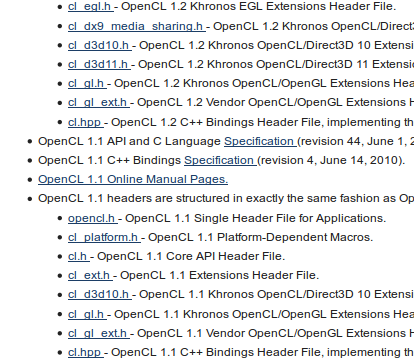
Problems arise when using deprecated functions, or have libraries that have calls to deprecated functions. Those can usually be avoided, but not when coding. For instance the cl.hpp for OpenCL 1.1 (found here) gives loads of warnings when you have the 1.2 library. Luckily this can easily be solved by adding some pragmas (works with GCC 4.6 and higher).

#pragma GCC diagnostic push
#pragma GCC diagnostic ignored "-Wdeprecated-declarations"
 --> the contents of cl.hpp
#pragma GCC diagnostic pop

The source of this trick has some more remarks when using GCC 4.5.

A word towards Linux distributions

OSX has OpenCL 1.2 by default for the host. Linux distributions have dependencies on OpenCL 1.1 for Nvidia-drivers, which is not needed – as explained above. They can easily go for a dependency on the OpenCL 1.2 library. The code provided by Khronos could be used.

AMD Hawaii power-management fix on Linux

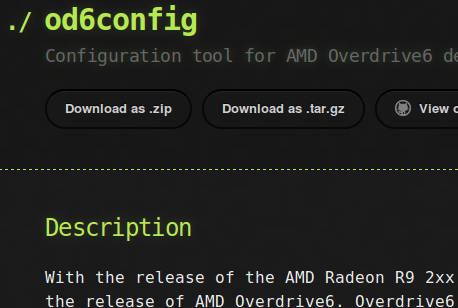
od6configThe new Hawaii-based GPUs from AMD (Radeon R9 2xx, FirePro W9100 and Firepro S9150) have a lot of improvements, one being a new OverDrive 6 (AMD’s version of NVIDIA GPU Boost). Problem is that it’s not supported yet in the Linux drivers and you will get too low performance – it probably will be solved in the next version. Luckily there is od6config, made by Jeremi M Gosney.

Do the below steps to get the GPU at normal speed.

  1. Download the zip or tar.gz from http://epixoip.github.io/od6config/ and unpack.
  2. Go to the directory where you unpacked the archive.
  3. run:
    make
  4. run:
    sudo make install
  5. check if it’s needed to fix the power management:
    od6config --get clocks,temp,fan
  6. if the values are too low, run:
    od6config --autofix --set power=10
  7. check if it worked:
    od6config --get clocks,temp,fan

Only OverDrive6 devices are set, devices using OverDrive5 will be ignored.

The PowerTune of 10 was what we found convenient for us, but you might find better values for your case. There are several more options, which are on the homepage of 0d6config. You need to run “od6config –autofix –set power=10” on each reboot.

Remember it’s third party software, so no guarantees to you and no “you killed my GPU” to us.

Call for Papers, Presentations, Workshops and Posters for IWOCL in Stanford

iwocl2015The IWOCL 2015 call for OpenCL Papers is now open and is looking for submissions from industry and academia relating to the use of OpenCL.  Submissions may refer to completed projects or those currently in progress and are invited in the form of:

  • Research Papers
  • Technical Presentations
  • Workshops and Tutorials
  • Posters

Examples of sessions from 2014 can be found here.

Deadlines at a Glance

Call for submissions OPENS: Wednesday 19th November, 2014
Call for submissions CLOSES: Saturday 14th February, 2015 (23:59 AOE)
Notifications: Within 4 weeks of the final closing date

Selection Criteria

The IWOCL Technical Committee will select submissions based on the following criteria;

  • Concept of the submission and its relevance and timeliness
  • Technical Depth
  • Clarity of the submissions; clearly conveying what your presentation
  • Research findings and results of your work
  • Your credentials and expertise in the subject matter

Unpublished Technical Papers

We solicit the submission of unpublished technical papers detailing original research related to OpenCL. All topics related to OpenCL are of interest, including OpenCL applications from any domain (e.g., scientific computing, video games, computer graphics, multimedia, information retrieval, optimization, text processing, data mining, finance, signal and image processing and numerical solvers), OpenCL performance analysis and modeling, OpenCL performance and correctness tools and proposed OpenCL extensions. IWOCL will publish formal proceedings of the accepted papers in The ACM International Conference Series. Please Submit an Abstract which should be between 1 and 4 pages long.

Technical Presentations

We solicit the submission of technical presentations detailing the innovative use of OpenCL. All topics related to OpenCL are of interest, including but not limited to applications, software tools, programming methods, extensions, performance analysis and verification. Please Submit an Abstract which should not exceed 4 pages.  The accepted presentations will be published in the online workshop proceedings.

Workshops & Tutorials

IWOCL includes a day of tutorials that provide OpenCL users an opportunity to spend more time exploring a specific OpenCL topic.  Tutorial submissions should assume working knowledge of OpenCL by the attendees and can for example cover OpenCL itself, any of the related APIs such as SPIR and SYCL, the use of OpenCL libraries or parallel computing techniques in general using OpenCL. Please Submit an Abstract which should not exceed 4 pages. Please include  the preferred length of the tutorial or workshop (e.g. 2, 3 or 4 hours).

Posters

To encourage discussion of the latest developments in the OpenCL community, there will be a poster session running in parallel to the main sessions and open during the breaks and lunch sessions.  The abstracts of the accepted posters will be published in the form of short communications in the workshop proceedings, provided that at least one of the authors has registered for the workshop. Please Submit an Abstract which should not exceed 2 pages.

Submit your abstract today

Go to Easychair, log in or register, and click on “New Submission”. Deadline is 14 February.

We sponsor HiPEAC again this year

HiPEAC is an academic oriented, 3-day, international conference around HPC, compilers and processors. Last year was in Vienna, this year in Amsterdam – where StreamHPC also is based. HiPeacThat was an extra reason to go for silver sponsorship, besides I find this conference very important.

Compilers have the job to do magic. Last year I had nice feedback on my request to give the developers feedback where in the code the compiler struggles – effectively slapping the guy/gal instead of trying to solve it with more magic. Also learned a lot about compilers in general, listened to GPGPU-talks, discussed about HPC, and most of all: met a lot of very interesting people.

Why you should come too? I give you five reasons:

  • Learn about compilers and GPU-techniques, in depth.
  • Have great discussions about the latest and greatest research, before it’s news.
  • Meet great people who create the compilers you use (or the reverse).
  • Visit Amsterdam, Netherlands – I can be your guide. Flights are cheap.
  • Only spend €400 for the full 3 day programme and a unique dinner with 500 people – compare that to SC14 and GTC!

If you are seeking for a job in HPC, compilers and GPGPU, you should really come over. We’re there, but several other sponsors are also looking for new employees too.

See the tracks at HiPEAC, which has a lot more GPU-oriented talks than last year. I selected a few from the list in bold.

Monday

  • Opening address
  • William J. Dally, Challenges for Future Computing Systems
  • Euro-TM: Final Workshop of the Euro-TM COST Action
  • Session 1. Processor Core Design
  • CS²: Cryptography and Security in Computing Systems
  • IMPACT: Polyhedral Compilation Techniques
  • MCS: Integration of mixed-criticality subsystems on multi-core and manycore processors
  • EEHCO: Energy Efficiency with Heterogeneous Computing
  • INA-OCMC: Interconnection Network Architecture: On-Chip, Multi-Chip
  • WAPCO: Approximate Computing
  • SoftErr: Mitigation of soft errors: from adding selective redundancy to changing the abstraction stack
  • Session 2. Data Parallelism, GPUs
  • James Larus, It’s the End of the World as We Know It (And I Feel Fine)
  • ENTRE: EXCESS & NANOSTREAMS
  • SiPhotonics: Exploiting Silicon Photonics for energy-efficient high-performance computing
  • HetComp: Heterogeneous Computing: Models, Methods, Tools, and Applications
  • Session 3. Caching
  • Session 4. I/O, SSDs, Flash Memory
  • Student poster session / Welcome reception

Tuesday

Don’t forget to meet us at the industrial poster-sessions.

  • Rudy Lauwereins, New memory technologies and their impact on computer architectures
  • Thank you HiPEAC
  • Session 5. Emerging Memory Technologies
  • EMC²: Mixed Criticality Applications and Implementation Approaches
  • ADEPT: Energy Efficiency in High-Performance and Embedded Computing
  • MULTIPROG: Programmability Issues for Heterogeneous Multicores
  • WRC: Reconfigurable Computing
  • TISU: Transfer to Industry and Start-ups
  • HiStencils: High-Performance Stencil Computations
  • MILS: Architecture and Assurance for Secure Systems
  • Programmability: Programming Models for Large Scale Heterogeneous Systems
  • Industrial Poster Session
  • INNO2015: Innovation actions in Advanced Computing CFP
  • Session 6. Energy, Power, Performance
  • DCE: Dynamic Compilation Everywhere
  • EUROSERVER: Green Computing Node for European Micro-servers
  • PolyComp: Polyhedral Compilation without Polyhedra
  • HiPPES4CogApp: High-Performance Predictable Embedded Systems for Cognitive Applications
  • Industrial Session
  • Session 7. Memory Optimization
  • Session 8. Speculation and Transactional Execution
  • Canal tour / Museum visit / Banquet

Wednesday

  • Burton J. Smith, Resource Management in PACORA
  • HiPEAC 2016
  • Session 9. Resource Management and Interconnects
  • PARMA-DITAM: Parallel Programming and Run-Time Management Techniques for Many-core Architectures + Design Tools and Architectures for Multi Core Embedded Computing Platforms
  • ADAPT: Adaptive Self-tuning Computing System
  • PEGPUM: Power-Efficient GPU and Many-core Computing
  • HiRES: High-performance and Real-time Embedded Systems
  • RAPIDO: Rapid Simulation and Performance Evaluation: Methods and Tools
  • MemTDAC: Memristor Technology, Design, Automation and Computing
  • DataFlow, Computing in Space: DataFlow SuperComputing
  • IDEA: Investigating Data Flow modeling for Embedded computing Architectures
  • TACLe: Timing Analysis on Code-Level
  • EU Projects Poster Session
  • Session 10. Compilers
  • HIP3ES: High Performance Energy Efficient Embedded Systems
  • HPES: High Performance Embedded Systems
  • Session 11. Concurrency
  • Session 12. Methods (Simulation and Modeling)

Hopefully till then!